

A proper imaging test lab setup is essential for reliable, repeatable image-quality measurements. Before configuring your lab with charts and equipment, consider the following:
Note: If you are photographer, student, and artist using Imatest Studio user, please refer to our Photography lab setup guide for relevant information.
Environment
To obtain precise measurements, your test lab should be set up in a space with little ambient lighting such as an interior, windowless room. Walls should be painted neutral middle gray (N5) to black, using a matte, flat, or eggshell wall paint to minimize reflected light. Reflective surfaces, such as polished metal or white/light colored surfaces, should be minimized. All additional light sources, including room lights, windows, doorways to other rooms, and LED indicators on equipment, should be covered or eliminated while conducting tests.
Field of View
Field of view (FoV) and focus distances determine which test chart to use and the required space for an image quality test lab. Lenses with normal, wide, ultrawide, and narrow FoV warrant different charts and equipment setups to test key image quality factors properly. Standard planar (flat) test charts are typically suitable for cameras with normal-to-wide FoV up to 160º, but not sufficient for ultrawide FoV camera systems.
Wide FoV typically ranges between 100º and 160º and has fixed-focus distances closer than normal. The lens-to-chart distance is commonly between 18cm and 1m. Predistorted charts are the best solution for testing wide FoV such as those captured by fisheye lenses. These charts are designed with pincushion distortion to correct for the lens’ barrel distortion so features within the captured image will be as rectilinear as possible.
To select an appropriate test chart size, you need to know the pixel dimensions (width and height) of your sensor, diagonal FoV of your lens, and ideal lens-to-chart distance. The Imatest Chartfinder can help determine the size of your imaging plane, which in turn will determine the correct size of test charts for your application.
SFR-w8_sample
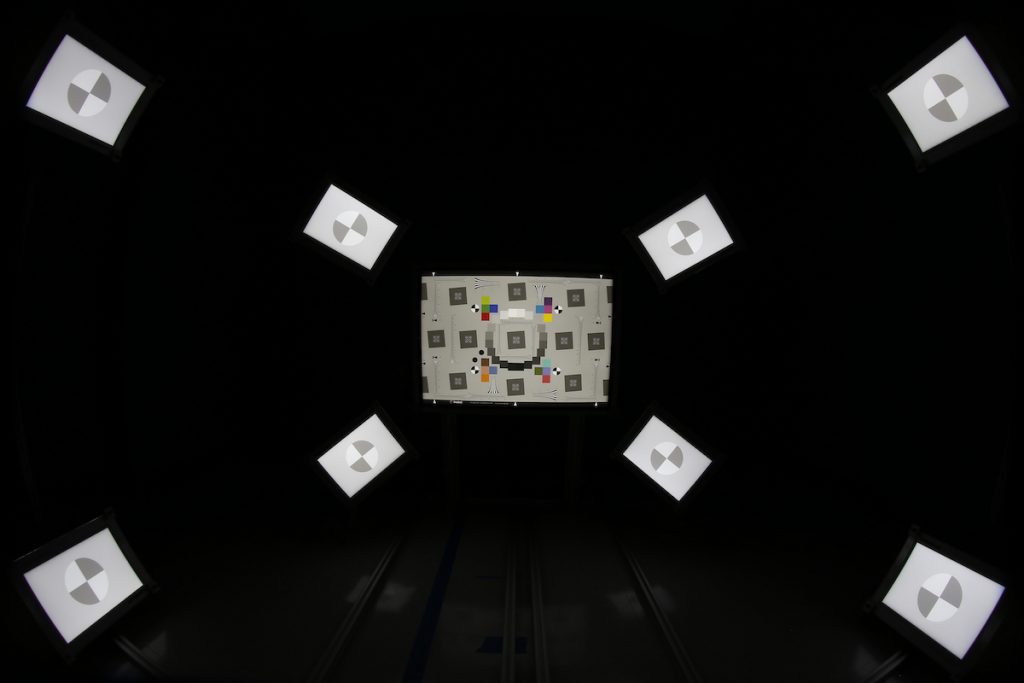
Ultrawide cameras with a FoV greater than 160º are increasingly common but can be challenging to test. For example, it is difficult to fill the image plane with a planar test chart even with pincushion predistortion. To solve this problem, place SFRreg charts outside of an eSFR ISO resolution test chart (Figure 1). The Imatest software eSFR ISO module will automatically detect these charts for analyzing sharpness and chromatic aberration.
The Imatest Ultrawide Test Fixture is designed to provide an out-of-the-box solution to align charts properly for measuring sharpness and chromatic aberration. THe Ultrawide Test Fixture works with cameras with FoV up to 180° at 1m or 270° at 50cm lens-to-chart distance. For testing ultrawide uniformity, a spherical light source becomes necessary to fill the FoV and avoid the cosine-falloff that will be present on a flat-panel light source.
Imatest FoV Solutions How FoV Determines Your Test LabLong Range and Narrow FoV Testing
Testing narrow FoV lenses, where the focusing range may cover between 5m and up to hundreds of meters, can be costly and complicated to achieve in most imaging labs. When testing requirements extend beyond your available space, collimating optics can produce virtual images at or beyond the hyperfocal distance.
If you are interested in testing narrow FoV lenses, Imatest offers custom solutions for testing long distances within a compact environment. Contact us for more information about simulating long distances.
Learn MoreTest Distances
At the very least, make sure to test beyond your minimum focus distance; however, determining the appropriate test distance depends on your device’s application. It may only be necessary to test your camera system beyond the hyperfocal distance to ensure it is acceptably sharp for far-away objects. Alternatively, you may require multiple test distances, such as one close to the minimum focus distance and another beyond the hyperfocal distance.
Test Lab Equipment
Imatest offers many solutions for setting up a professional image quality test lab:
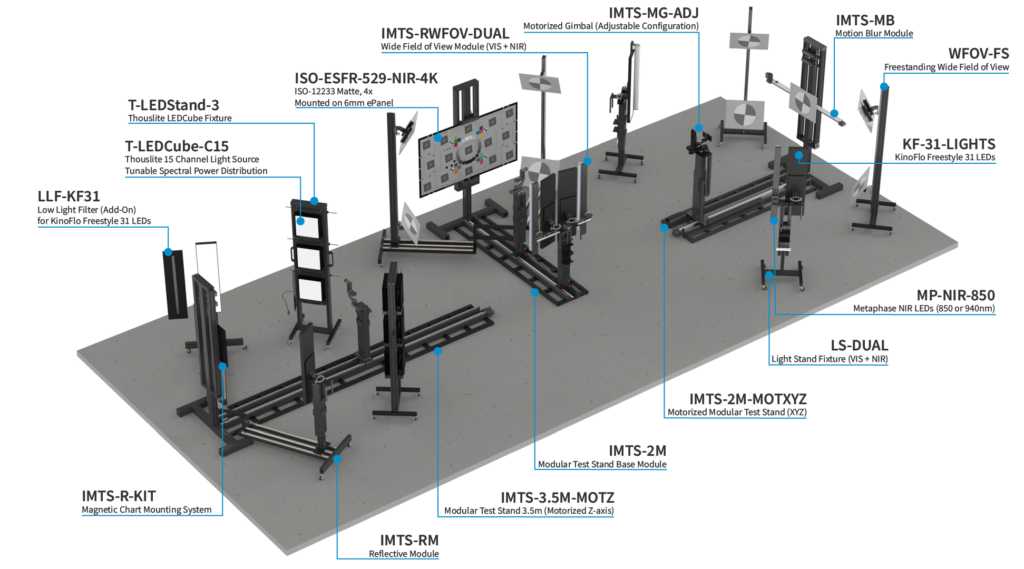
- Imatest Modular Test Stand—This test chart mounting system offers great efficiency and versatility. Available with three rail lengths to accommodate different test distances, the base module of our modular test fixture system can accommodate chart sizes 22cm x 28cm (8.50″ x 11″) through 110cm x 144cm (43″ x 56″). The MTS is compatible with Imatest Light Panel sizes C through G (and sizes A and B with an adaptor).
- IMTS Reflective Module – The Reflective Lighting Module seamlessly integrates with MTS base module and the KinoFlo LED Lighting System (sold separately).
- IMTS Wide Field of View Module—integrates with the MTS Base Module to provide an easy to use platform for sharpness testing of wide FOV camera systems up to 200º with test distances between 0.5m – 1.5m.
- Benchtop Test Stand—An easy-to-use, modular platform for image quality testing up to 0.5 or 1.1 meters. The fixture is well-suited for testing endoscopes.
- Collimator Fixture—allows long-range testing in space-restricted environments. Each Collimator Fixture includes a validation procedure that ensures a minimal work-distance error and an onboard computer that display and saves camera positions, lens and light panel configurations, and simulated distances.
- Automatic Test Chart System—uses robotics for the automatic placement of test charts into the imaging plane, offering quick interchangeability between many charts with the touch of a button.
Reflective Modular Test Stand Ecosystem
Transmissive Modular Test Stand Ecosystem
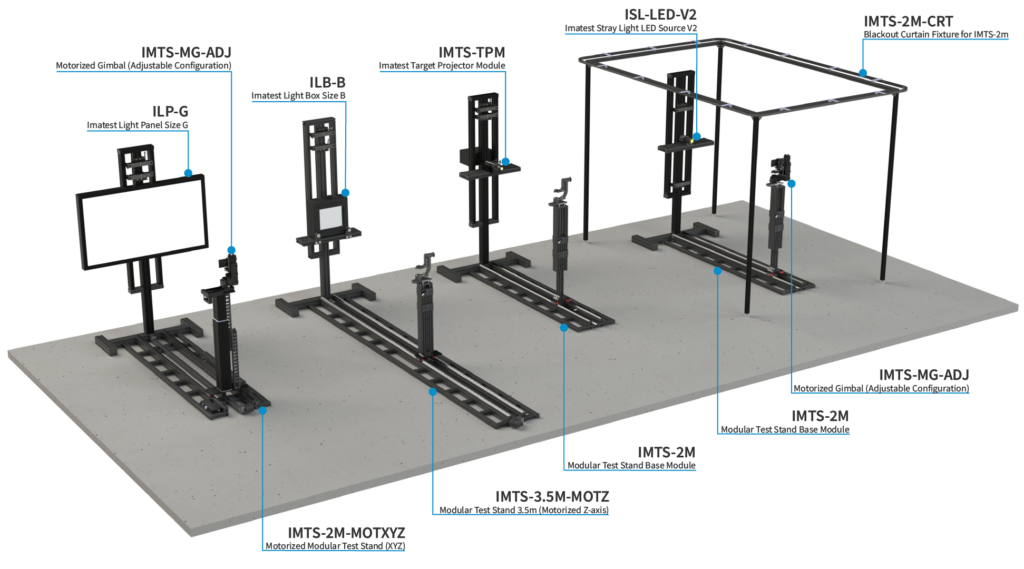
Modular Test Stand Base - 2 Meters
Benchtop Test Stand Ecosystem
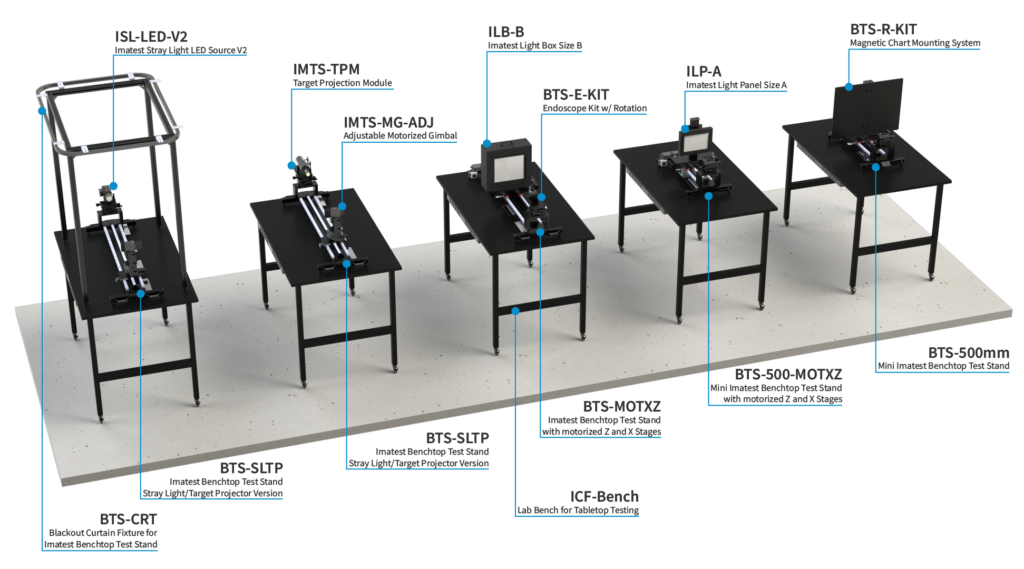
Collimator Fixture Ecosystem
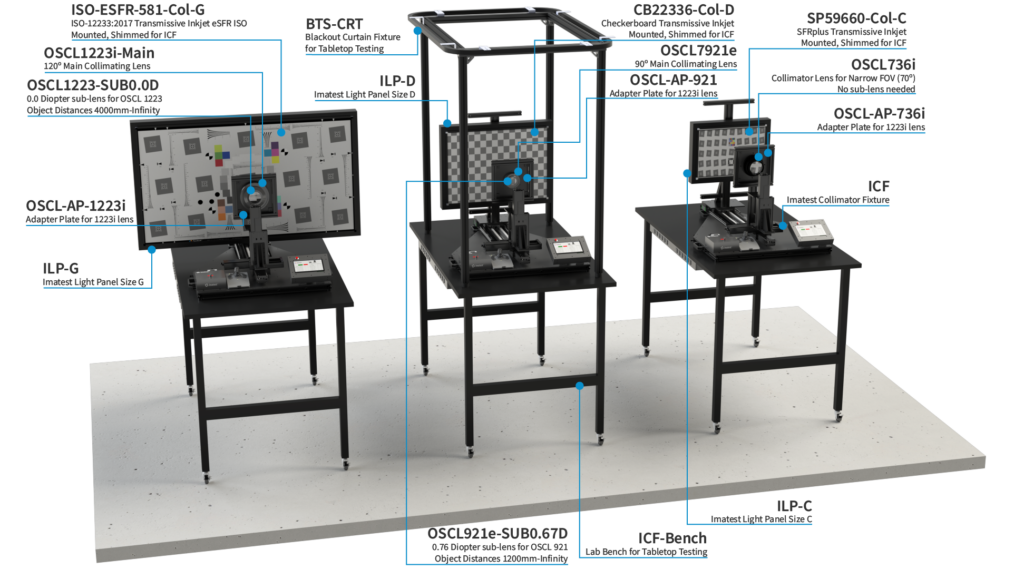
Light Panel Size G
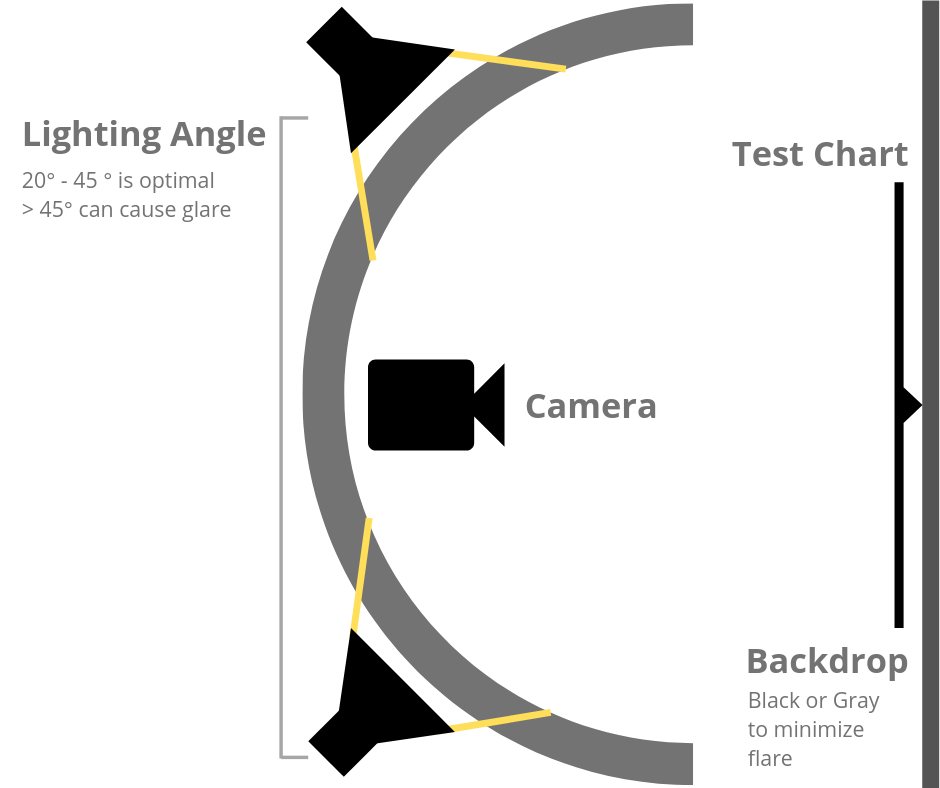
Figure 2. Test lab lighting setup
Lighting
Arrange lighting equipment for even, glare-free illumination. Lighting angles should be between 35° and 45° (Figure 2). Avoid placing any lighting behind the lens or at angles greater than 45° because doing so can cause glare and cast shadows on the test chart. Angles less than 20° can cause issues with texture and lighting uniformity. It is beneficial to have light modifiers to reduce flare light. Orienting your reflective light fixtures vertically allows for even illumination by keeping light levels consistent from the bottom to the top of the test chart. For detailed lighting arrange information, see here.
Addressing Glare
Matte charts are ideally suited for avoiding glare under most test scenarios. Glare in the outer patches of a test chart can ruin measurements and hard to avoid in semigloss charts. If you use semigloss charts, reduce glare by decreasing the angle between the lights and the chart, but verify your illumination levels remain consistent. If you’re not sure whether testing needs can be met with a matte chart or need help troubleshooting glare, contact Imatest.
Lighting Uniformity Requirements
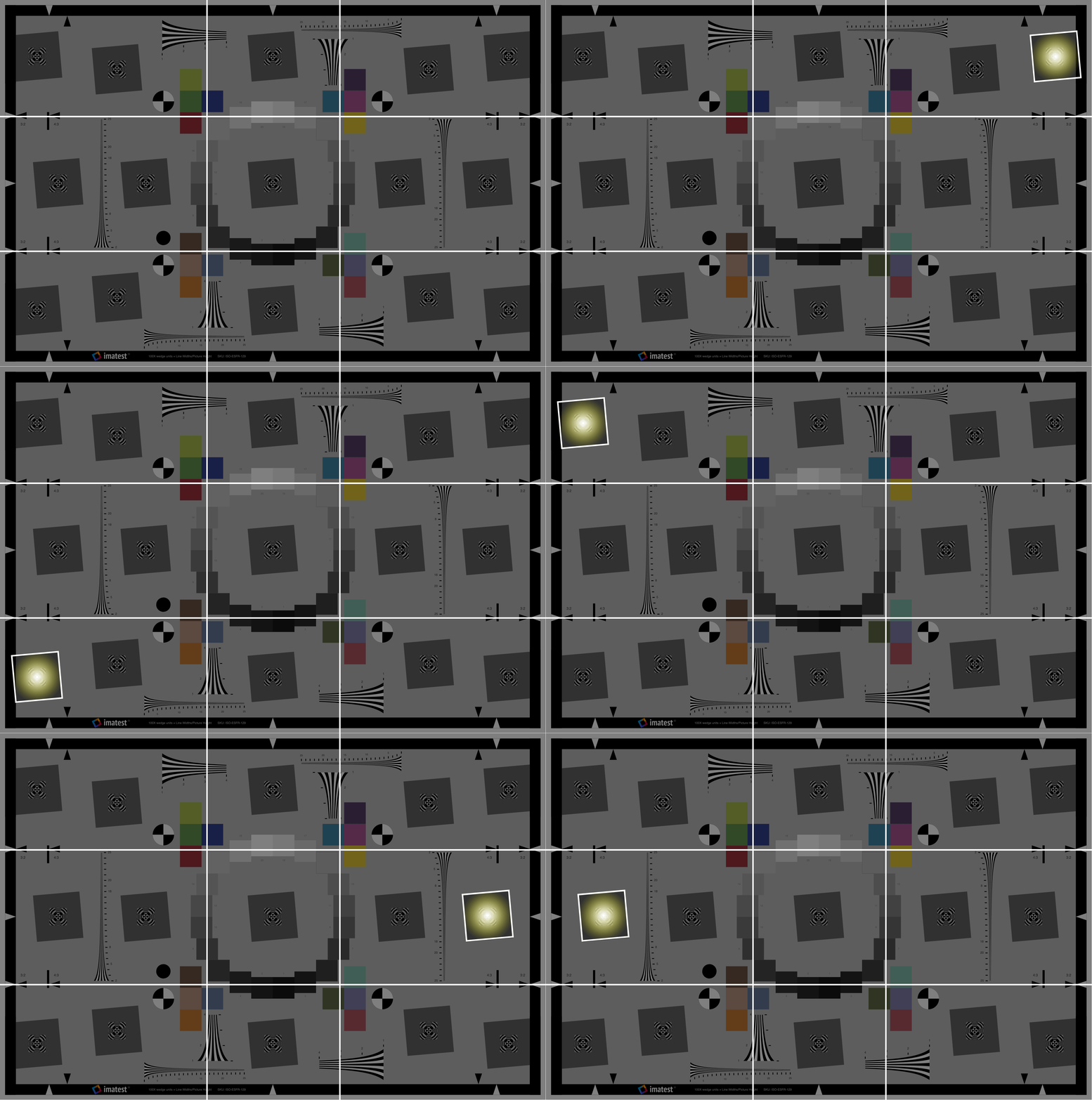
Figure 3. Light Measure Animation. Click image to view.
Lighting uniformity is strongly affected by the distance and orientation of the light source. To measure uniformity, think of the chart like a grid, and check the illuminance level in each grid square. Start by checking the center square, then each corner and side. You may also check the illuminance levels at each key feature of the chart, such as the slanted-edge squares in the eSFR ISO test chart (Figure 3). You should have no more than 20% variance in uniformity over the entire chart for SFR/MTF and distortion measurements, where small portions of the target are analyzed and exposure is not critical. Uniformity with only ±5% variance or better is required for accurate tonal and color measurements (Stepchart, Colorcheck, and Multicharts).
When selecting light sources, consider ones with high uniformity to ensure accurate chart readings (refer here for the effects of non-uniform lighting on sharpness measurements). Integrated dimming capabilities can be useful when measuring imaging system quality across different levels of light to simulate multiple real-world scenes.
Uniformity
Uniformity measurements indicate an imaging system’s tendency to become darker the farther away from the center of the image. This occurrence is due to the radial nature of the lens which collects more light in the center and can be particularly strong with wide angle lenses. Testing for uniformity requires light sources with the highest uniformity levels possible. Imatest Lightboxes and Light Panels are available with 90% uniformity or 95% for sizes A through C (an option for the Light Panels), which is sufficient for most devices. If you are testing uniformity for an ultrawide camera, you will need to use a spherical light source because a flat-field light source will not completely fill the FOV in order to test the uniformity of the whole sensor.
Imatest Uniform Lighting SourcesReflective Mounting
Reflective test charts can test most image quality factors. High illumination reflective light sources are required for accurate chart measurement. The vertical orientation of our reflective lighting options keeps light levels consistent from the bottom to the top of the test chart. For a more detailed overview of reflective lighting qualities, see our Reflective Lighting page.
The reflective lighting system we recommend for most applications is the KinoFlo LED DMX Lighting System.
Imatest Reflective Light SourcesTransmissive Chart Lighting
Transmissive chart lighting provides a solution for ultra-high resolution and dynamic range testing. For accurate analysis, transmissive charts need to be placed on a uniform, backlit light surface (such as a lightbox or light panel). A highly uniform light source allows you to test the uniformity of your camera. Imatest offers a variety of uniform light sources, including the Imatest LED Light Panel which is compact and portable, has integrated chart mounting, and features wireless controls. For dynamic range and ultrahigh resolution testing, the Imatest LED Lightbox with a high-precision film chart is better suited. It has high-uniformity levels of 90% to 95% and comes in a wide range of sizes (shown below) and intensities.
Imatest Transmissive Chart Lighting SourcesChart Mounting
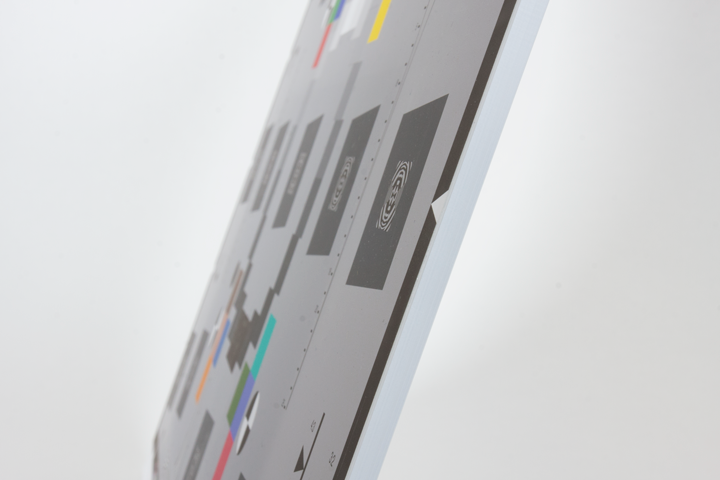
Figure 1. Clear Acrylic Mounting for Transmissive Testing
Always wear clean, white cotton gloves when handling a test chart to prevent damage and blemishes. Store your chart in a low-heat, low-humidity environment away from direct sunlight. To ensure accurate and repeatable results, use a professionally mounted chart as well as a mounting system that enables precise alignment of your chart and lens (Figure 1). It is strongly recommended that charts be mounted on a smooth flat surface, like an acrylic board, to ensure no blemishes, bends, or bubbles occur that negatively impact image quality measurements. Imatest offers the option to professionally mount our test charts on acrylic or ePanel. See our Chart Mounting Solutions page for more.
Camera to Target Alignment
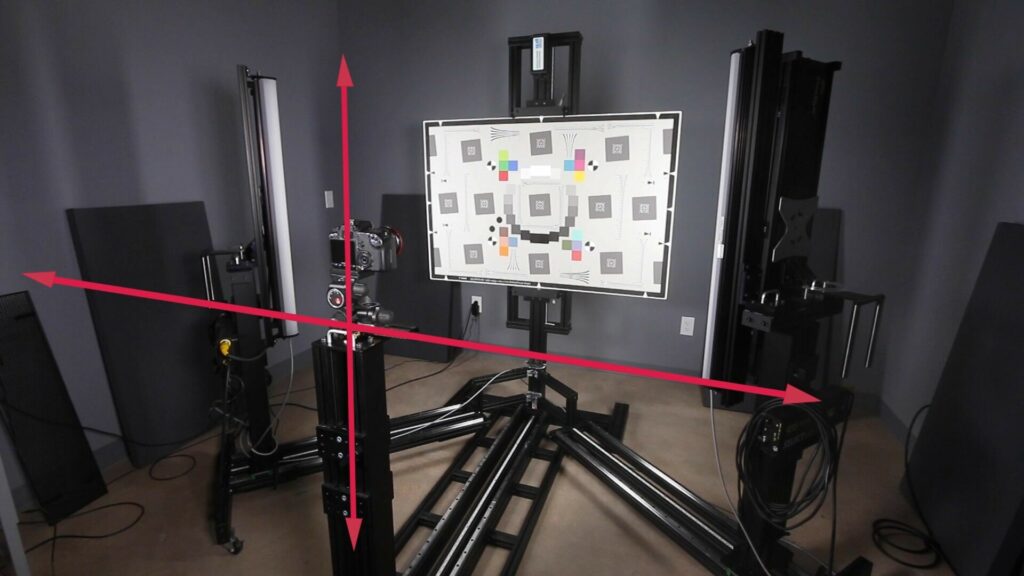
Check that your chart and camera system are level relative to one another. The chart need not be level with the ground if it is level with the device. If your environment allows, it is acceptable to test your device pointed down with the chart on a floor or table; e.g., with a microscope.
Software
If you are interested in Imatest software, click here for installation instructions. For more information about Imatest software, see our licensing page. Once Imatest is installed, instructions for getting started can be found here.
Direct Image Acquisition
Imatest supports direct acquisition from a wide range of frame grabbers and cameras as well as industry standard interfaces like CameraLink, GigE Vision, and USB through DirectShow (Windows) or QuickTime (OS X). Direct image acquisition cuts out several steps in the image quality testing process. Click here to learn more.
Request a Test Lab Consultation